Log it once. Count it your way.
Start a drive with one tap or add it afterward. Road44 reads the same log as supervised hours, miles, gig earnings or trips, and keeps all of it on your phone.
From the driveway
to the logbook.
No account to create. Pick what you are tracking when you first open the app, and every drive after that counts toward it.
Start it, or add it later
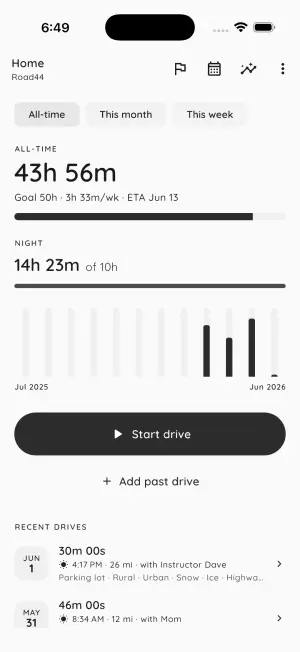
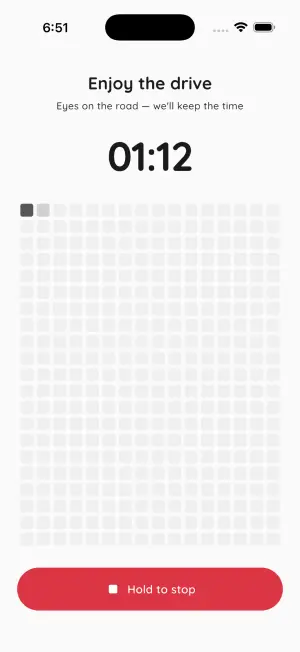
Tap Start drive as you pull out and a full-screen timer runs until you hold to stop. Forgot to start it? Add the drive afterward with its real start and end times.
It counts toward your goal
Each drive adds to the total you chose to track: hours, distance, net earnings or trips. In hours mode, night driving also counts toward its own target.
Export the logbook
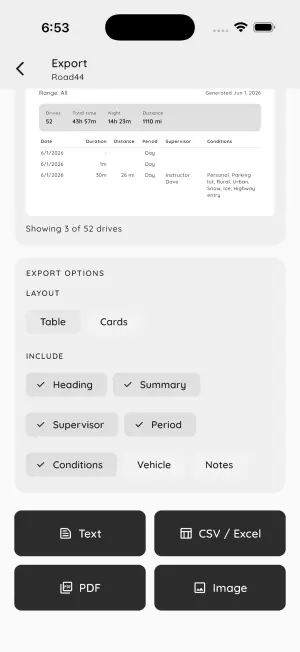
When an instructor, a test day or your own records call for it, share the log as a PDF, CSV, text file or image. Every format is free, with no watermark.
One log, four ways to read it.
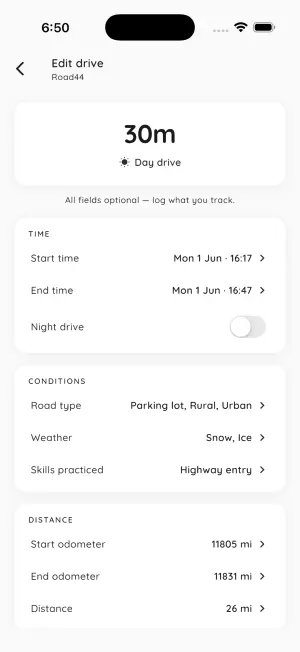
Road44 keeps one record per drive: when it started and ended, whether it was day or night, the distance from your odometer or a number you type in, and any money in or out. The metric you pick decides how those records add up. Hours mode totals your drive time and counts night hours toward their own target. Distance mode totals miles or kilometers. Earnings mode nets each drive as gross pay plus tips, minus expenses and fuel. Trips mode counts each drive as one.
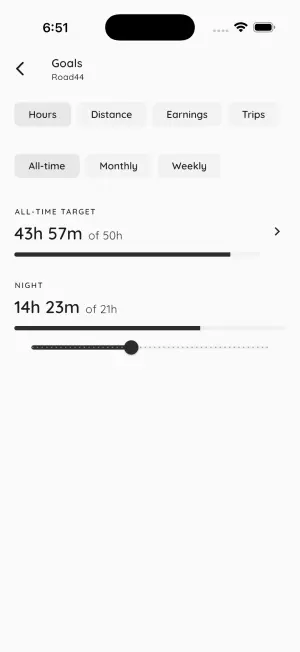
Change the metric on the Goals screen and every total, goal bar, chart and calendar day recalculates from the drives you already have, so nothing gets entered twice. A learner logging supervised hours can see the miles covered, and a delivery driver tracking net pay can see how many hours it took. Road44 is a personal record, not an official logbook, so check what your licensing office or instructor accepts before you hand in an export.
Pick a mode and log your first drive in Road44 — free on iOS & Android →
Built for the whole drive.
Logging, the all-time goal, history, the calendar and every export format are free. Road44 Pro adds recurring weekly and monthly goals, the Insights screen and 27 more themes.
A drive mode that holds on
One tap starts a full-screen timer with a grid that fills one cell per minute. Switch apps or close Road44 mid-drive and it reopens right where it was. Stopping takes a press and hold, so a stray tap won't end the drive.
Backfill any drive
Add a drive you forgot to time, or open any past drive to fix it. Every field is optional, and the supervisors and vehicles you used recently come up as one-tap suggestions.
Day and night hours
Set an all-time hours goal with a separate night-hours target, for permit programs that count night driving on its own. Night is set from the start time, and you can flip it by hand.
Mileage and gig earnings
Odometer readings or a typed trip distance roll up into a mileage record. Add gross pay, tips, expenses and fuel, and Road44 works out the net for each drive, to the cent.
See when and how you drive
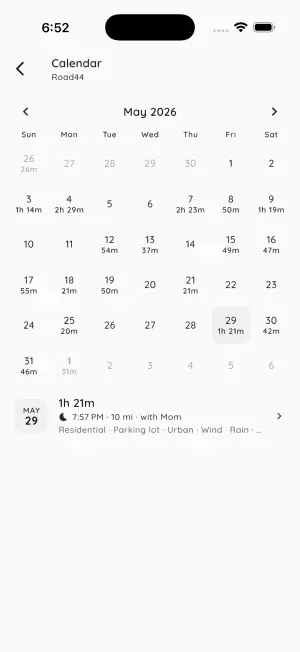
A heatmap of the hours you drive across the week, plus averages, fuel economy, streaks, records, and breakdowns by road type, weather, purpose, vehicle and supervisor. Insights come with Road44 Pro.
A logbook you control
Share a Table or Cards layout as text, CSV, PDF or PNG. Pick the date range, choose which fields to include, and check the preview before it goes. Your drives stay on your phone until you send one.
More tools for the
way you actually work.
Road44 is part of a small lineup of single-purpose apps. All free to download. No accounts. No ads.
Hours Tracker
Clock in and out of work shifts, split overtime from regular hours, and see your real take-home pay. For the hours you work when you're not behind the wheel.
Tip Tracker
Log every tip you earn across jobs, with tip-out and taxes worked out, so you can see which shift actually pays and what you take home.
Tax Calculator
Estimate your federal refund before you file, including self-employment tax if you drive for a gig app. The numbers stay on your phone.
Budget Tracker
Put fuel, insurance and repairs into a monthly budget next to everything else you spend, with recurring bills and saving goals. All stored on your phone.
Frequently Asked Questions
Is Road44 free?
Yes. Live and past drive logging, every drive field, all four tracking modes, the all-time goal with its night-hours target, history, the calendar, the daily reminder, three themes and logbook export in every format are free, with no watermark. Road44 Pro adds recurring weekly and monthly goals, the full Insights screen (free users see a blurred preview) and 27 more themes. Pro is a weekly or annual subscription, with a free trial when you are eligible, and the price in your currency is shown in the app before you confirm.
Can I log supervised driving hours for my learner's permit?
Yes, that is what hours mode is for. Set a total hours goal and an optional night-hours target, then log each practice drive with the supervisor's name, road types, weather and the skills you practiced. Night hours are totaled separately from day hours. When you need to show your hours, export the log as a PDF or another format. Road44 is a personal record, not an official logbook, so check whether your licensing office or instructor accepts it or needs their own form.
Can I track mileage or gig earnings instead of hours?
Yes. Choose Distance to total miles or kilometers from odometer readings or a trip distance you type in, Earnings to net gross pay plus tips minus expenses and fuel, or Trips to count drives. You can switch at any time on the Goals screen, and every total, goal and chart recalculates from the drives you have already logged.
Does Road44 work offline?
Yes. Logging, drive mode, goals, history, the calendar and exports all run on your phone without a connection. Distance comes from the odometer readings or trip distance you enter. The app uses the internet to send anonymous crash and usage stats and to check a Pro subscription with the App Store or Google Play.
Where is my driving log stored, and who can see it?
Only on your phone. There is no account and no server: drives, goals and settings are stored on your device and never sent to us, and the anonymous crash and usage stats never include them. An export leaves your phone only when you share it. Uninstalling the app deletes the log, so export a copy first if you want to keep a record.
What formats can I export my logbook in?
Text, CSV, PDF (A4) and PNG image, in a Table or Cards layout. Pick a date range, turn the heading, the summary totals and fields like supervisor, earnings, conditions, vehicle and notes on or off, and preview the page before you share it. Date, duration and distance are always included. Every format is free, with no watermark.
Start your logbook.
Free on the App Store and Google Play. Choose hours, distance, earnings or trips, and your first drive is one tap away.
The shape of the app.
Six screens from the app: the home hub, drive mode, the drive entry form, goals, insights and logbook export.